CN
CN  EN
EN 

Can You Build a Trading Robot Without Coding on Phillip MT5?
Phillip MetaTrader 5 gives traders an environment to create, test, optimise, and deploy algorithmic trading strategies for live trading in one platform.
A common question among beginners is:
“Do I need to learn programming first?”
On the Phillip MT5 trading platform, the answer is: not necessarily.
Traders can access MQL5 Wizard, a guided tool in Phillip MT5 that helps them create an Expert Advisor, or automated trading robot, without writing code from scratch.
This does not mean algo trading is effortless, risk-free or guaranteed to be profitable. But for traders who want to understand how algo trading works, MQL5 Wizard can be a practical starting point.
By the end of this guide, traders will understand how MQL5 Wizard helps create Expert Advisors, how Phillip MT5 supports backtesting and optimisation, and how Phillip Nova’s MT5 Expert Advisor e-book can help them prepare before considering live trading.
How Trading Ideas Become Expert Advisors on Phillip MT5
Before using MQL5 Wizard, it helps to understand one simple idea: an algo trading bot does not predict the market. It follows predefined rules.
For example, a trader may look at a chart and think, “The market seems to be trending upward.” But a trading robot needs that idea to be written as a clear condition, such as whether a Moving Average is rising, whether price has crossed a certain level, or whether an indicator shows stronger momentum.
In simple terms, the process of creating a trading bot looks like this:
Trading Idea → Clear Trading Rules → Expert Advisor
An Expert Advisor or EA is an automated trading robot on Phillip MetaTrader 5. It follows clear trading rules, and depending on its setup, can place and manage trades automatically.
This is where the MQL5 Wizard becomes useful. Instead of learning to code at first, traders can start by exploring ready-made trading logic, money management rules and risk management settings that help them understand how an automated trading strategy is structured.
This makes Phillip MT5 a practical starting point for traders who want hands-on exposure to the algo trading workflow.
How to Create an Expert Advisor with MQL5 Wizard
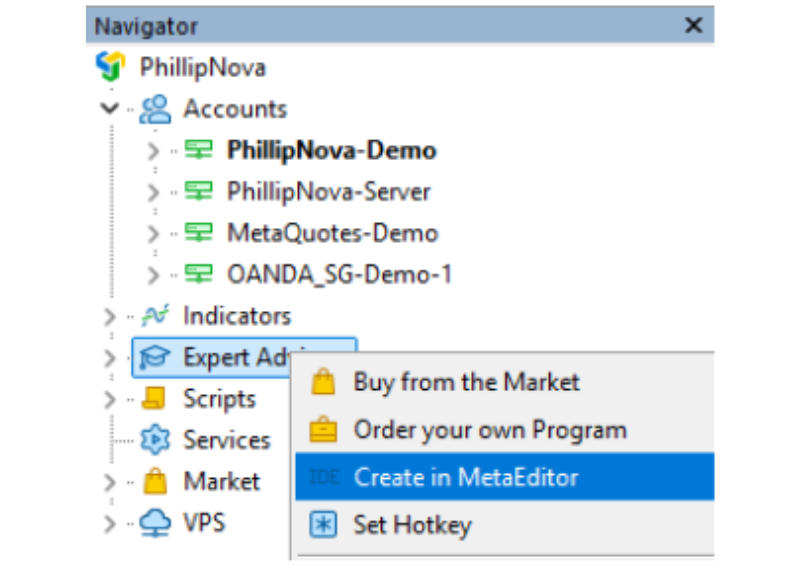
To start with MQL5 Wizard, users can go to the Navigator window on Phillip MT5, right-click Expert Advisors, and select Create in MetaEditor.
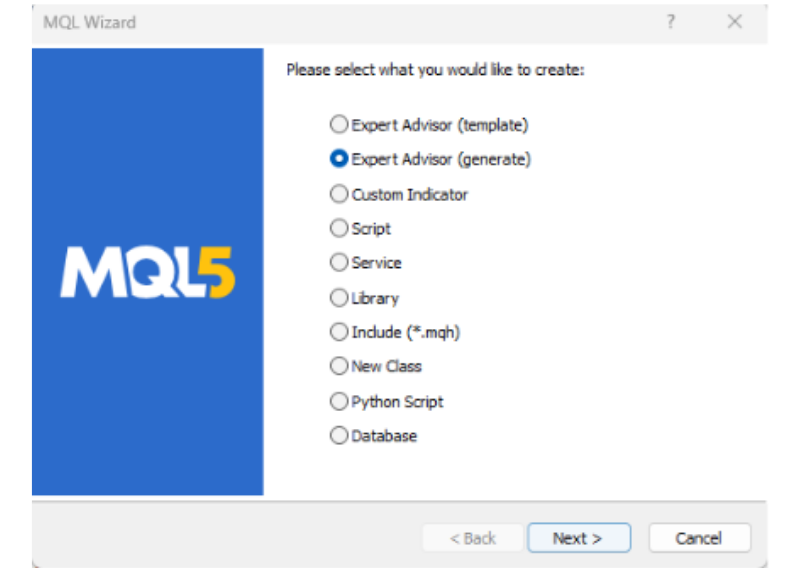
After MetaEditor opens, users can choose Expert Advisor (generate), 点击 下一个 to start creating an EA without coding.
The main building blocks of an EA created with MQL5 Wizard usually include:
| Component | What It Does |
|---|---|
| Trading signals | Defines what market conditions the EA looks for |
| Money management | Defines trade size or risk-related rules |
| Stop Loss and Take Profit | Defines selected exit rules for the EA |
| Trailing Stop | Defines how the EA manages a position in profit |
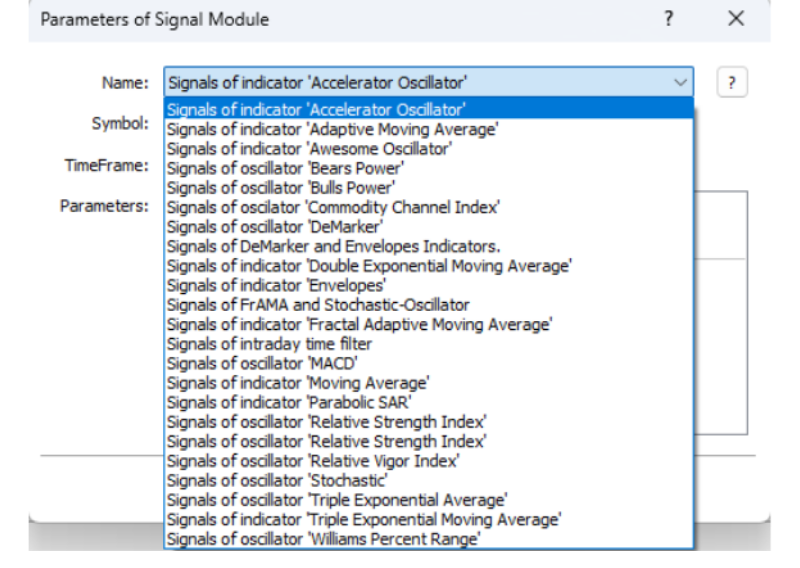
One of the most important steps is choosing trading signals. These signals tell the EA what type of market condition it should identify. In MQL5 Wizard, users can select from a list of indicators that produce trading signals through a guided screen.
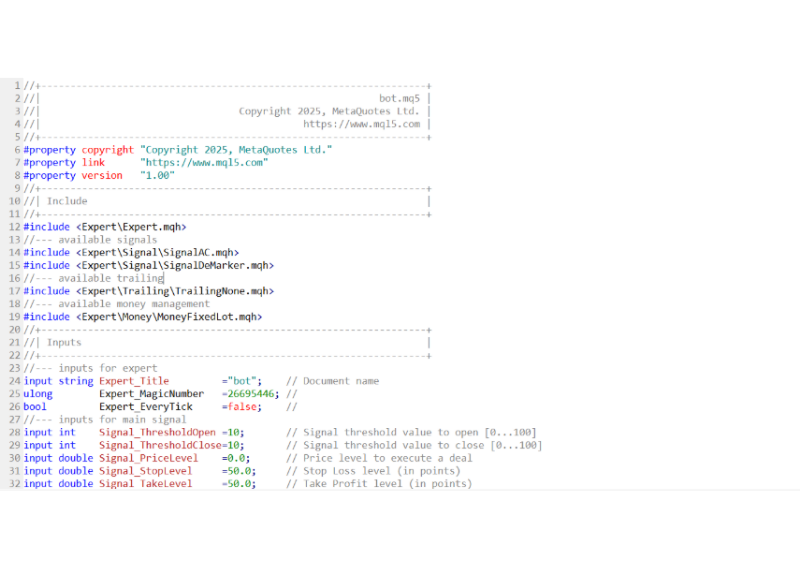
After the setup is completed, MQL5 Wizard generates the EA code in MetaEditor, as shown in the example below. Beginners can see how the EA is created as a coded program behind the scenes.
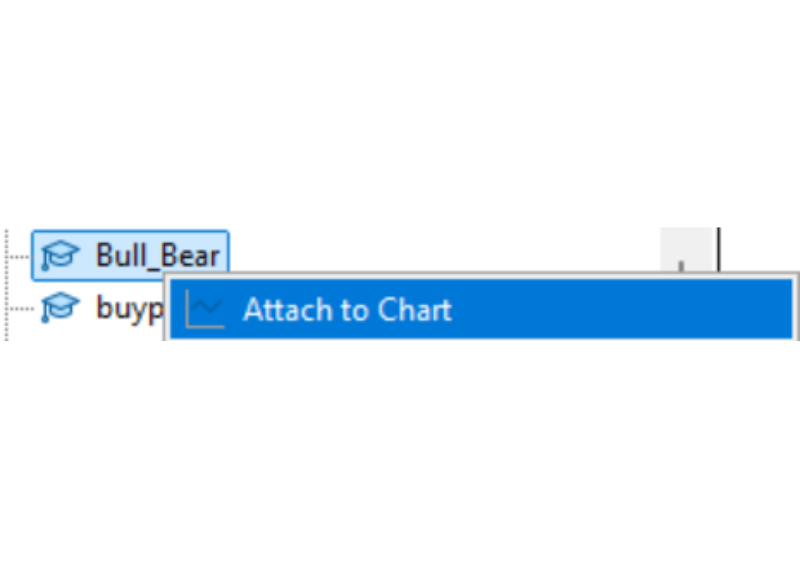
Once the EA is compiled, it will appear in the Navigator window in Phillip MT5. Traders can then find the EA in the Navigator window on Phillip MT5 terminal and attach it to a chart. However, before considering live trading, traders should first test the EA and understand how it behaves under different market conditions.
What Trading Signals Are Available in MQL5 Wizard?
So, what exactly are these trading signals?
In simple terms, trading signals are rule-based ways to describe market conditions. By choosing a signal in MQL5 Wizard, users are choosing what type of market behaviour they want the EA to pay attention to.
Many of these signals are based on indicators traders may already recognise, such as RSI, MACD, Stochastic and the Accelerator Oscillator.
Users can combine multiple trading signals in one EA. For example, one signal may check whether the market is trending, while another may check price momentum.
However, more signals do not automatically mean a better strategy. Adding too many conditions may reduce trading opportunities or make the EA too sensitive to small market changes. To make better use of MQL5 Wizard, it is key to understand what a trading signal is trying to measure and whether the overall logic makes sense.
Example: How a Trading Signal Looks in Practice
A trading signal usually starts with a market observation, and it turns into a rule.
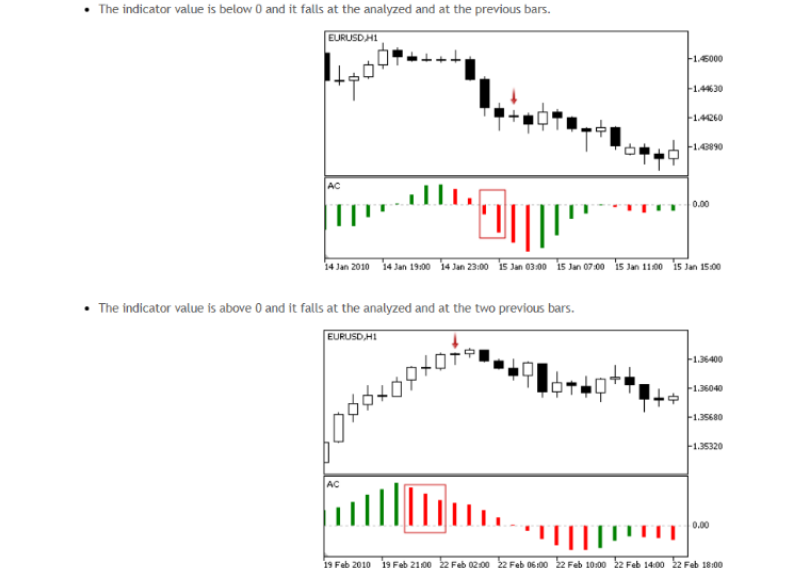
For example, the Accelerator Oscillator is an indicator measuring market momentum. When the indicator value crosses below zero, it may suggest continued downward momentum. When the indicator value declines from a peak, it may suggest weakening momentum or a possible change in direction as shown in the charts below.
来源: MQL5.com
For traders who want to explore the technical details, “MQL5 Wizard: Creating Expert Advisors without Programming” explains how trading signals in MQL5 Wizard are structured and used.
How to Backtest and Optimise an Expert Advisor on Phillip MT5
Creating an EA is an important first step in algo trading. After it is built, traders should review how it may have performed under selected past market conditions.
This is where Phillip MT5 becomes more than just an EA creation environment. It also gives traders a place to test, review, and practise their automated strategies.
One key feature is Strategy Tester. It allows traders to backtest an EA using historical market data and review how the EA may have traded under selected past market conditions.
As shown in the example below, traders can view the EA’s trade entries and exits on the price chart, together with a performance graph showing equity changes over time. This helps traders better understand how the EA behaves under selected settings and market conditions instead of only looking at the trading logic on paper.
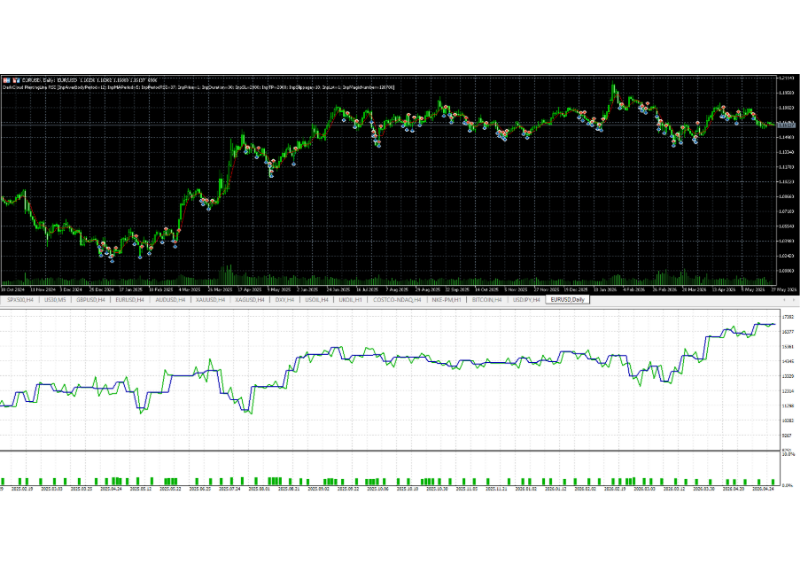
Example of Strategy Tester on Phillip MT5 showing a free EA in Phillip MT5 backtested on EURUSD with trade entries and exits displayed on the price chart and equity changes shown below.
However, a backtest is only one simulation based on a selected period and one set of EA inputs. The EA may perform differently when its settings or market conditions change.
Traders can therefore use the optimisation function in Strategy Tester to test different EA settings. For example, they may adjust the EA’s indicator parameters, trade size settings or risk control rules to see how these changes affect its behaviour and performance. The goal is not just to find a strong historical result, but also to understand how the EA behaves under different inputs to cope with different market conditions.
This may sound like there is a lot to learn, but traders do not need to figure everything out at once. On Phillip MT5, they can move step by step.
For traders who do not want to build their own EA, MQL5 Market offers another way to start algo trading. Traders can browse ready-made EAs, including free and paid options, directly through the MQL5 Market page on Phillip MT5 terminal.
Whether traders create their own EA with MQL5 Wizard or explore ready-made EAs from MQL5 Market, Phillip MT5 gives them a practical environment to learn the full algo-trading workflow: building, testing, optimising, and practising before live trading.
That is why having a step-by-step guide can be helpful, especially for beginners who are trying algo trading for the first time.
Start Learning Algo Trading with Phillip MT5 and the MT5 Expert Advisor E-book
If you are interested in algo trading but do not know where to start, Phillip MT5 offers a practical starting point.
At this point, traders may understand that creating an EA is the first step and programming is not necessarily required. The next step is learning how to test, optimise and practise EA properly. That is where Phillip Nova’s MT5 Expert Advisor e-book can help
Start with a Free Guided eBook
The e-book is designed to guide beginners through the EA workflow in a more structured way, including:
| What the E-book Covers | Why It Helps |
|---|---|
| Obtaining an EA | Learn how to explore ready-made EAs from MQL5 Market |
| Creating an EA | Learn how to create an EA with AI Assistant or MQL5 Wizard |
| Backtesting | Understand how to review EA behaviour and performance |
| Optimisation | Learn how to adjust EA’s input setting and how different settings may affect EA’s performance. |
| Demo practice | Learn how to practise trading using an EA before live trading |
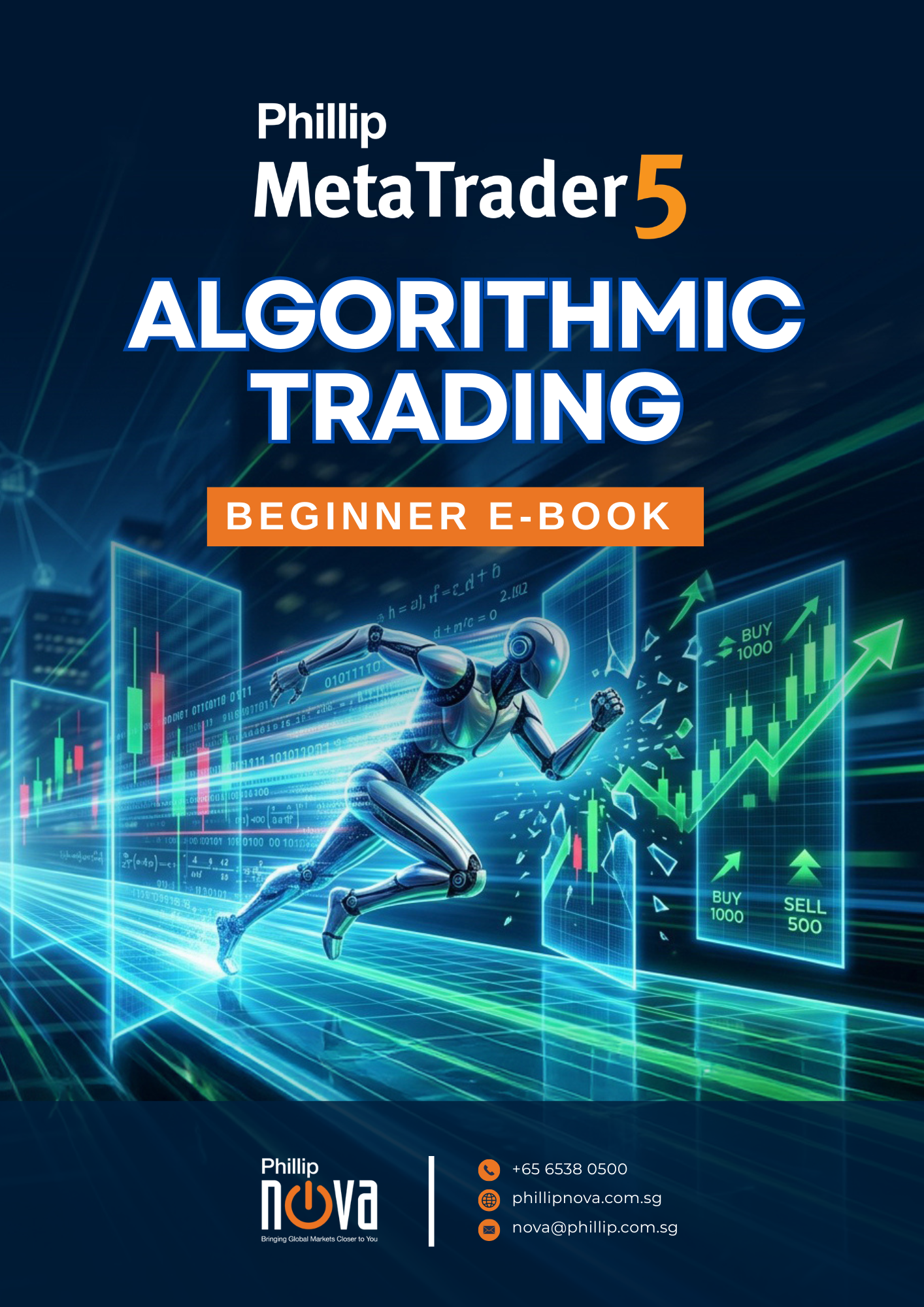
这 Phillip MetaTrader 5 Algo Trading Beginner E-Book is designed to support that transition. Instead of focusing only on concepts, it walks through a more practical, step-by-step approach to using algo trading on Phillip MT5. From placing your first automated trade to understanding how an EA behaves, the guide helps you build familiarity with the workflow in a clearer and more structured way.
For those looking to go further, Phillip Nova conducts regular seminars and webinars focused on algo trading.
These sessions provide a more hands-on perspective, allowing you to see how EAs are applied, how strategies are tested, and how the overall process comes together on Phillip MT5. They are designed to complement the initial learning phase and offer additional guidance as you progress.
Whether through a demo 或者 live environment, taking a structured approach can help you build a stronger foundation as you explore algo trading and better understand what is MT5 platform in real trading conditions.