CN
CN  EN
EN 
外汇交易 is one of the most popular markets in the world because of its high liquidity, easy access, and global reach. Traders can buy and sell currencies 24 hours a day, reacting instantly to news and economic events across regions. Many beginners searching for how to trade forex in Singapore often start by understanding the importance of proper risk management.
However, these advantages also bring risks. Leverage lets traders control large positions with little capital, magnifying both profits and losses. Without proper forex risk management, capital can disappear quickly. Phillip MetaTrader 5 (MT5) helps reduce these risks with built-in tools like stop-loss and take-profit orders, trailing stops, price alerts and automated strategies.
Why Risk Management in Forex Trading is Crucial for Long-Term Success
Many new forex traders chase quick profits, but without proper risk control most accounts don’t last long. Risk management is what separates short-lived speculation from long-term trading success. Understanding risk control is a core foundation for anyone learning how to trade forex in Singapore effectively.
Trader Mistakes
The most common risks come from traders themselves. Over-leverage is one trap as traders may open positions too large for their accounts which can be wiped out after a small market move. Emotional trading is another trap, where fear and greed lead traders to keep losing positions or exit winning trades too late.
Market Risks
Experienced traders also face risks beyond their control. Central bank actions, unexpected inflation data, or political events can move prices sharply in seconds. While these events can’t be predicted, traders can control how much they are willing to risk on each position.
Capital Protection First
The first priority in forex trading should be protecting capital, not chasing profits. With proper risk management, traders can stay in the market long enough to learn, adapt, and grow. The Phillip MetaTrader 5 (MT5) platform supports this with a wide range of built-in risk management tools.
Using MT5 to Strengthen Risk Management
Stop-Loss and Take-Profit Orders
One of the most effective ways to manage risk in forex is by using stop-loss (SL) 和 take-profit (TP) orders. These tools are especially important for traders researching how to trade forex in Singapore using professional platforms.
- A stop-loss automatically exits a trade if the market moves against you, stopping a small loss from becoming a big one.
- A take-profit closes a trade once your target is reached, securing profits before the market reverses.
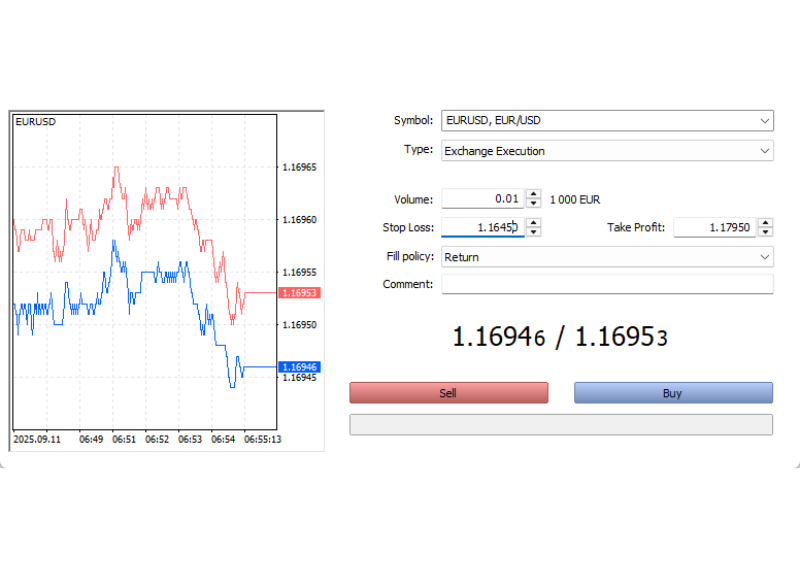
Example: Suppose EUR/USD is trading at 1.1695. You could:
- Enter trades at 1.1695.
- Set stop-loss 50 pips below at 1.1645.
- Set take-profit 100 pips above at 1.1795.
- This creates a 1:2 risk–reward ratio.
Source: Phillip MetaTrader 5
Trailing Stop-Loss
MT5 also supports trailing stop-loss orders, which is a stop-loss order that moves with market price automatically when you are making profits.
- When you buy a pair and the price goes up, the trailing stop moves up with it and stays a set distance (e.g. 30 pips) below the current price.
- If the price then turns and starts going down, the trailing stop freezes at its highest level. From there, two scenarios can happen:
- If the price keeps falling and hits the trailing stop, your trade is closed, and profit can be secured.
- If the price rises again, the trailing stop resumes moving upward again, following the price at the set distance.
This tool helps you protect profits (or reduce losses) while still leaving room for your profit to grow.
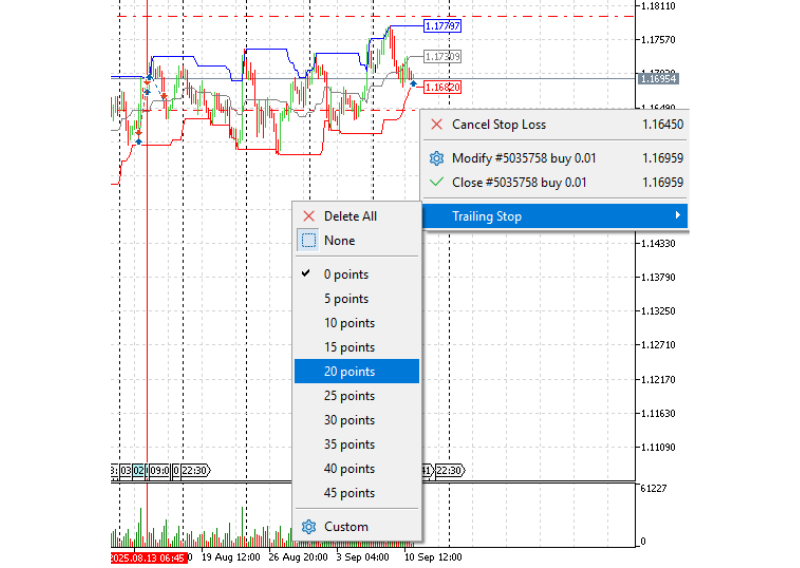
How to Set Trailing Stop-loss in MT5
- Place your order with a stop loss.
- Right-click on the stop-loss line on chart.
- Select Trailing Stop.
- Select the number of pips for the trailing stop-loss .
Source: Phillip MetaTrader 5
Position Sizing & Lot Calculation
Position sizing determines how much you risk per trade. A simple rule is to risk only 1–2% of your account balance per trade. This way, a few losses will not wipe out your account.
Example with trading EUR/USD
- Your Account balance: USD 10,000
- Your allowable risk of loss: 1% = USD 100
- Pair: EUR/USD (spot price 1.16962)
- Contract size: 1 lot = 100,000 EUR
- Minimum trade size: 0.01 lot
Suppose you set a 50-pip stop-loss:
- At 1 lot, each pip is worth about USD 100.
- A 50-pip move against you would result in a USD 500 loss.
To limit stop loss at 1% of your account, which is USD 100, the position size would need to be adjusted to:
- USD 100 ÷ (50 pips × USD 10 per pip) = 0.2 lots.
- At this size, each pip is worth USD 2, so a 50-pip loss = 50 * 2 = USD 100.
Tools for calculating position size:
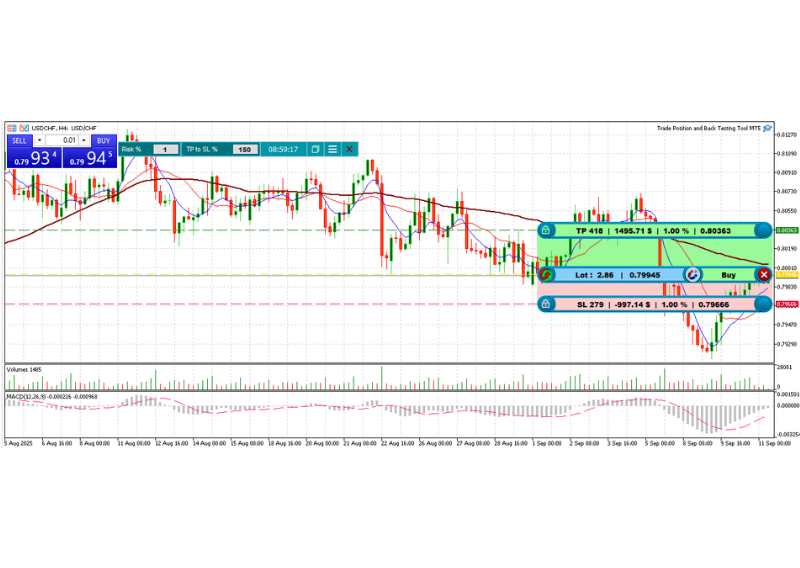
- MT5 supports custom indicators and Expert Advisors (EAs). You can find a position size calculator on MQL5 community via Phillip MT5 platform, which can automatically calculate and suggest the correct lot size based on your stop-loss and chosen risk %.
- Once installed, it integrates into your chart, so you don’t need to do the math each time.
A free MT5 position size calculator EA: Trade Position and Back Testing Tool MT5
Source: Phillip MetaTrader 5
Diversification Across Currency Pairs
Diversification in forex means not relying on a single currency trend. For example, buying both EUR/USD and GBP/USD doubles your exposure to the US dollar. If the dollar strengthens, both trades may lose.
A practical approach is to trade pairs you know well and spread risk across them. Since each pair behaves differently, beginners should start with major pairs like EUR/USD, GBP/USD, and USD/JPY, then gradually add other pairs to expand their portfolio.
Diversification can also involve hedging. For example, going long EUR/USD means shorting the USD, while going long on USD/CHF means buying the USD. Since these pairs often move in opposite directions, trading them can help reduce exposure to a single currency trend.
How MT5 supports diversification by:
- Market Watch window: track multiple pairs’ prices in real time.
- Multiple Charts: compare pairs’ charts side by side to spot correlations between them.
- Exposure by Currency: see how much of each currency you are holding and avoid placing too much of your account into the market.
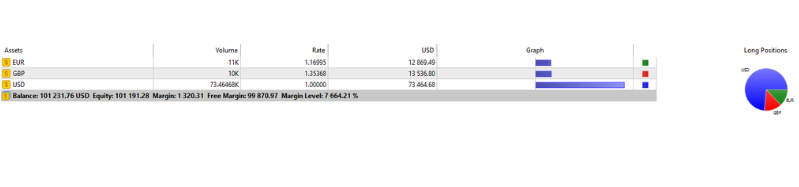
- Hedging in MT5: you can open both buy and sell positions in the same or correlated pairs on MT5 for hedging risks.
Other Risk Management Tools in MT5
- Price Alerts
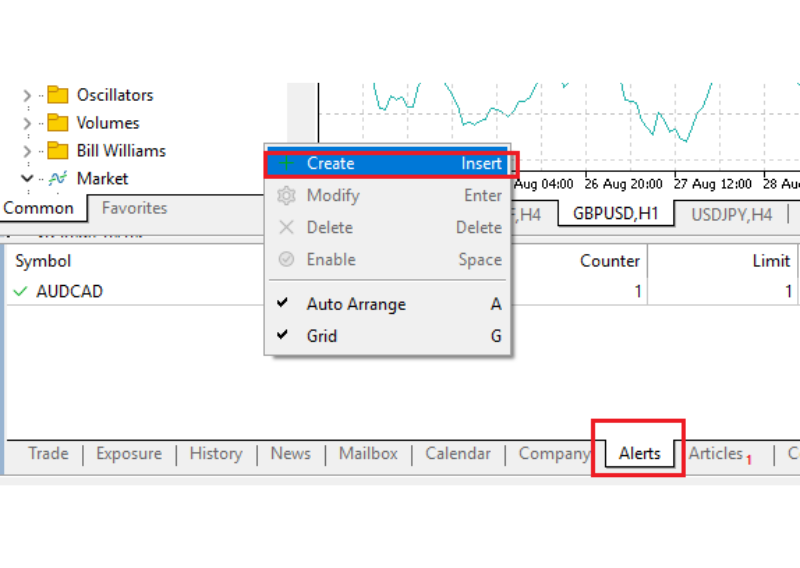
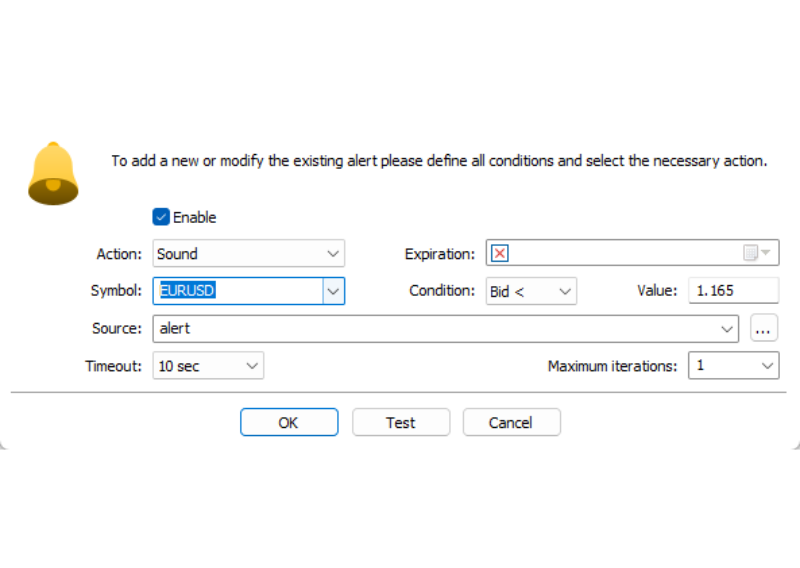
MT5 lets you set alerts when price reaches your chosen level so you don’t need to watch charts all day. Alerts help you react quickly to big movement without emotional trading.
How to set up alerts
- Open ‘Alerts’ tab at the bottom of the Terminal window
- Right click on the window of Alerts and choose Create
- Choose your currency pair
- Select the price that triggers alerts
- Indicators
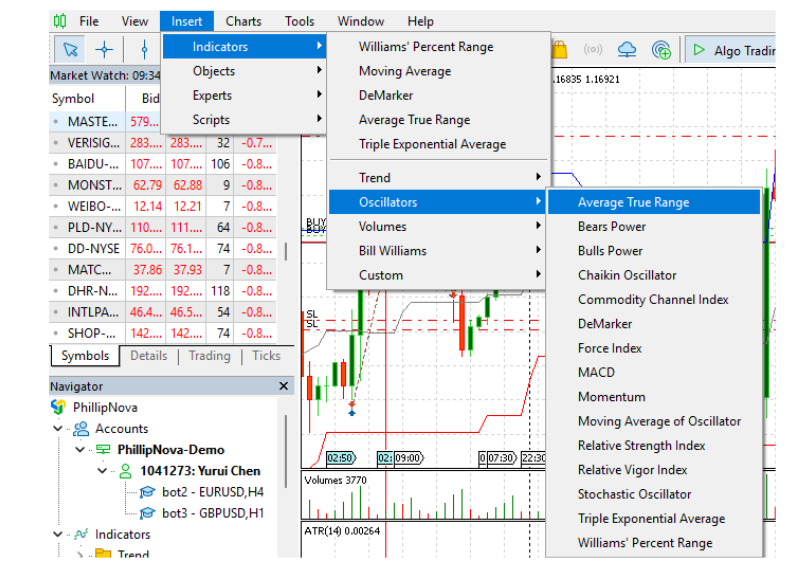
MT5 includes many built-in indicators such as ATR, RSI, and MACD. While they don’t guarantee profits, they help confirm entries and exits so you don’t rely only on price charts. For example, you might check RSI to avoid buying a pair when it is already overbought.
- Expert Advisors (EAs)
MT5 supports automated trading through Expert Advisors (EAs). An EA is a small program that can place, manage, or close trades for you automatically, based on the rules you set. For risk management, this means an EA can do things like:- Stop trading or close all trades if your losses hits a set drawdown limit a day (e.g., 2% in a day).
- Automatically apply stop-loss and take-profit levels to every new trade.
- Limit the number of open trades at once, so you don’t take on too much risk.
The main benefit of EAs is that they remove emotions from trading. Instead of reacting in the heat of the moment, the EA follows your rules exactly, keeping your trade consistent.
How to access EAs in MT5:
- Open Navigator window, expand the Expert Advisors folder to see any EAs already installed.
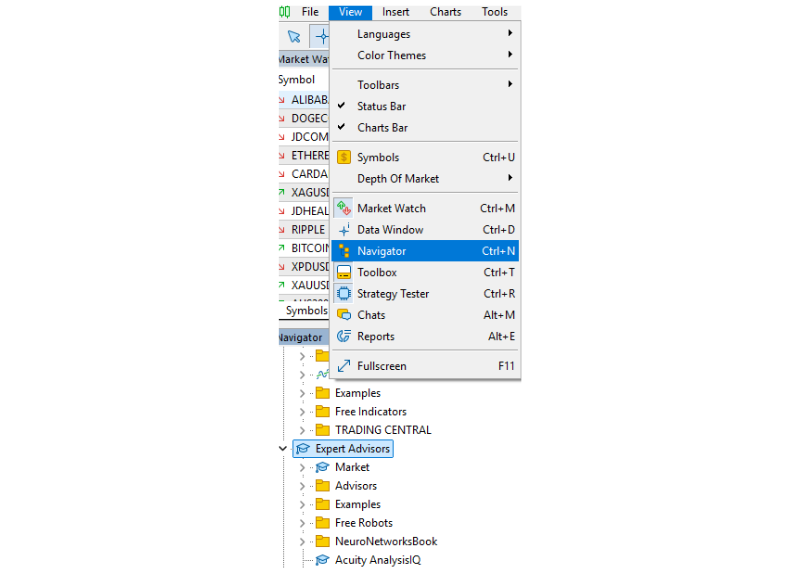
- Drag an EA onto a chart to apply it.
- Adjust settings of the EA (e.g., risk percentage, stop-loss pips) to match your trading plan.
- Click the AutoTrading button on the toolbar to enable or disable all EAs.
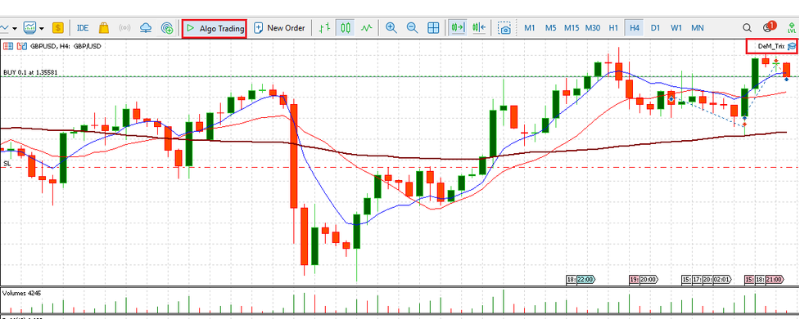
You can also download free or paid EAs from the MQL5 Market directly inside Phillip MT5 or even create your own through AI or your own knowledge. Many traders use ready-made risk management EAs.
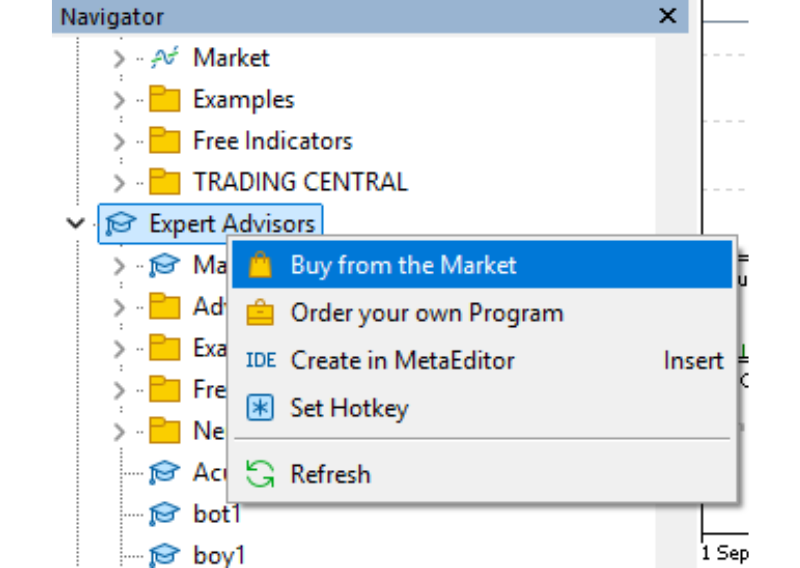
- Reports and Trade History
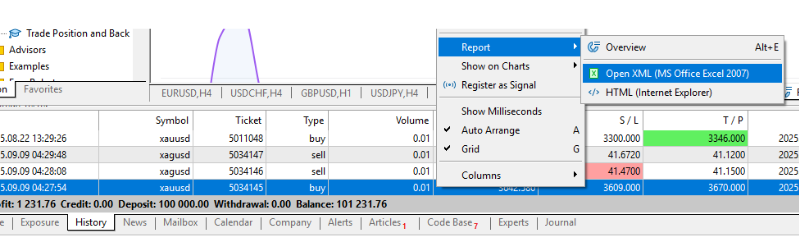
MT5 automatically records all your trades, allowing you to generate detailed reports. These show statistics such as your win/loss ratio, average profit, and average loss. The reports can also be exported to Excel for convenience.
By reviewing them regularly, you can spot useful patterns, such as losing more on certain pairs or specific times of day and adjust your strategy accordingly to reduce risk exposures.
Forex Trading Discipline: Practical Tips for MT5 Users
Discipline is the key to long-term trading success. Here are simple habits to follow:
- Stick to your plan – Decide trading size, entry price, stop-loss, and take-profit before trading, and avoiding changing them on impulse.
- Risk small – Limit each trade to only risk 1–2% of your account. One bad trade won’t put your account at serious risk.
- Keep a journal – Note down why you entered each trade and review later to learn from mistakes.
- Practise first – Use MT5’s demo account to test your strategies, EAs and indicators before risking real money.
- Set alerts – Let MT5 notify you when price reaches your level, so you don’t stare at charts all day.
- Review periodically – Check your MT5 history to analyse your strategies’ win rates in each currency pair.
These small steps help you stay calm, reduce emotional decisions, and protect your account.
Conclusion
Forex trading offers exciting opportunities but also carries high risks. The difference between traders who succeed and those who fail lies in their approach to forex risk management. Protecting capital should come first, as profits can only follow when risk is under control.
的相关 trading platform makes this process easier with powerful risk management tools such as trailing stops, price alerts, trade history reports, and Expert Advisors for automation. Still, tools alone are not enough. Lasting success in forex trading requires using them with discipline, consistency, and a clear strategy.
Ready to start your forex trading?
Sign up for a free demo on Phillip MetaTrader 5 and practise trading in a safe environment. When you’re ready, open a live account with Phillip Nova MT5 and trade with confidence on a trusted MAS-regulated platform for individuals exploring how to trade forex in Singapore, disciplined risk management and proper use of MT5 tools remain essential.