EN
EN  CN
CN 

Many people new to trading think placing a trade is just clicking Buy or Sell. But how you place that trade can change the result. This is especially important in cfd trading, where execution speed and order control directly affect risk and pricing.
Order types help you control three practical things: the price you trade at, when the trade happens, and how you limit losses. Once you understand them, trading becomes less about guessing in the moment and more about placing clear instructions and letting the platform execute them.
In this guide, we’ll explain the main order types in plain language, along with a few advanced orders like stop-limit, and tools like trailing stops, fill policies, and OCO that can help you trade with more control.
Why Order Types Matter in Trading
When you place a trade, you’re not choosing Buy or Sell. You’re also choosing how the trade should happen and end.
That “how” is decided by order types. They matter because they affect three practical things:
- Price: Do you accept the current price, or wait for the price you want to trade or exit at?
- Timing: Do you need the trade to happen right now, or can it wait?
- Risk: Do you set a clear price level to exit if the trade goes against you?
When these choices aren’t clear, trading gets more uncertain. People chase prices, miss entries they planned, or hold losses too long because they hesitate. Order types add structure by helping you plan your entry and exit before emotions take over.
Once you understand what each order type is designed to do, it becomes much easier to place trades with more control and consistency.
Three Types of Orders

Market Orders: Speed Over Precision
Designed to do:
A market order is used to buy or sell immediately at the best available price at that moment. If you place a large market order, for example, buying 1,000 spot gold contracts, it may be filled in parts at slightly different prices depending on how many sellers are available at each price.
Use when:
Market orders are useful when the speed of your trade matters more than the exact entry price, such as:
- You’re trading a popular, actively traded product, where market orders usually get a fair price.
- The move is happening fast and waiting for a specific price could mean missing the trade.
Key trade-off to remember:
A market order is fast, but you can’t control the exact price you buy or sell. If prices are moving quickly or the liquidity is low, you may end up buying at a higher price or selling at a lower price than you expected.
Limit Orders: Trading With Price Control
Designed to do:
A limit order lets you choose the price you want. When you place a limit order, you will set an entry price, and it will only place an order when the market price reaches your entry price. This helps you avoid chasing prices, but it may take time to enter a trade —or it may not fill at all.
Buy Limit:
- You set a price below the current market price.
- It will only buy at that price or lower.
- Use when:
- you want to enter a buy trade at a cheaper level, expecting the price may drop first before rising again.
- You want to close a short trade and take profit at a target price in a period.
Sell Limit:
- You set a price above the current market price.
- It will only short sell at that price or higher.
- Use when:
- You want to enter a short trade at a higher price than now, expecting the price may rise a bit before falling.
- You want to close a buy trade and take profit at a target price
Key trade-off to remember:
A limit order gives you price control, but if market price doesn’t reach your limit price, you may miss the trade.
Stop Orders: Managing Breakouts and Risk
Designed to do:
A stop order lets you set a price level that activates only when the market reaches it. This is useful when you want to enter a trade only after price moves to a certain level, or exit a trade automatically if price moves against you.
Buy Stop:
- You set a price above the current market price.
- It activates only when price reaches that level or higher.
- Use when:
- you want to buy only after price moves above a key level, expecting it may keep rising.
- You want to close a short trade (stop-loss) only when price rises against you to a key level.
Sell Stop:
- You set a price below the current market price.
- It activates only when price reaches that level or lower.
- Use when:
- You want to short sell only after price drops below a key level, expecting further downside.
- You want to close a buy trade (stop-loss) only when price falls against you to a key level.
Key trade-off to remember:
A stop order helps you act automatically, but you may not get the exact stop price if the market is moving fast. You could end up buying a bit higher or selling a bit lower than you expected.
Advanced Order Types Used by Active Traders

Now that you know the main order types, the next tools are about improving control: limiting surprise prices, locking profits, and managing how orders fill.
Stop-limit orders
Designed to do:
A stop-limit order lets you set two prices: a stop price and a limit price.
When the market reaches your stop price, the order turns on the limit price. Your trade will only happen if price later returns to your limit price. This is useful when you want confirmation first, then enter at a better price (cheaper price for buy and higher price for short sell).
Buy Stop-Limit:
- You set a stop price above the current market price.
- You set a limit price below the stop price.
- When price rises to the stop price, the order turns on your limit price.
- You will buy if price later pulls back to your limit price.
- Use when: you think price may break higher, but you want to buy only if it pulls back after the breakout.
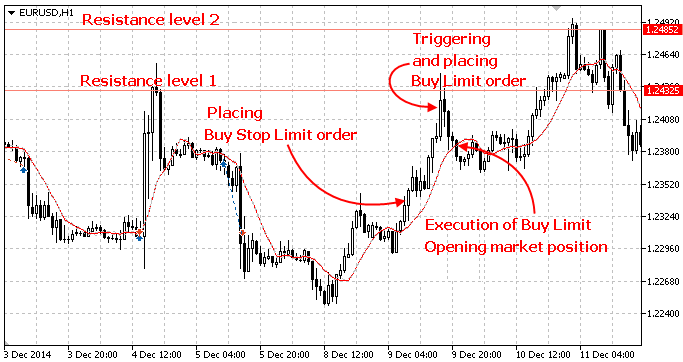
Source: Phillip MetaTrader 5
Sell Stop-Limit:
- You set a stop price below the current market price.
- You set a limit price above the stop price.
- When price falls to the stop price, the order turns on your limit price.
- You will short sell if price later rebounds to your limit price.
- Use when: you think price may break lower, but you want to short only if it bounces back after the breakdown.
Key trade-off to remember:
This approach can give you a better entry price because you wait for a pullback—but you may miss the trade if price breaks out and keeps moving without coming back to your limit price.
Trailing stops
Designed to do:
A trailing stop is a stop-loss that moves with the price when your trade is in profit. It helps you protect profits automatically while still allowing the trade to keep running if price continues in your favour.
How it works:
- You set a trailing distance (for example, 50 points).
- If price moves in your favour, making your trade in profit, putting your trade into profit.
- If price turns back and hits the trailing stop, your position is closed automatically.
Trailing Stop for a Buy (Long) position:
- The trailing stop moves up as price rises.
- It does not move down if price falls.
Trailing Stop for a Sell (Short) position:
- The trailing stop moves down as price falls.
- It does not move up if price rises.
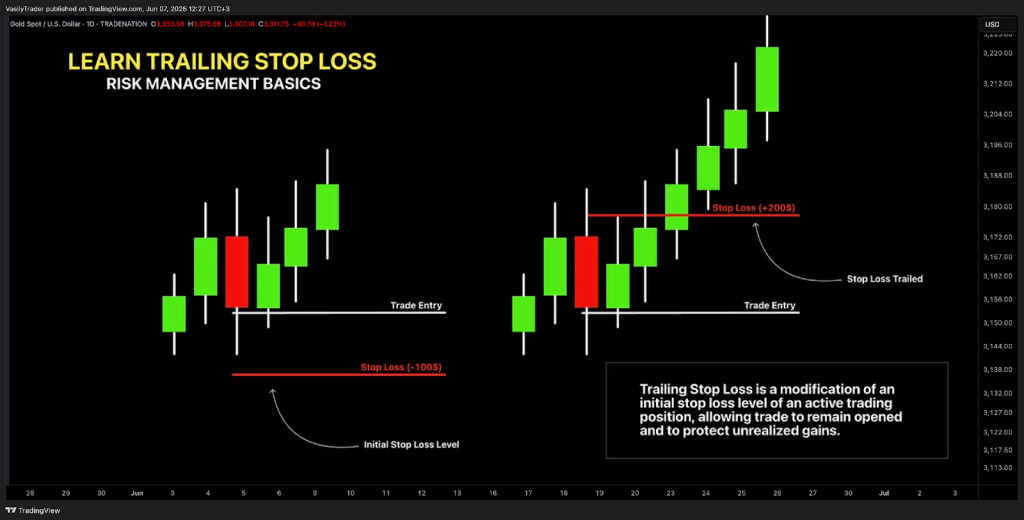
Source: TradingView
Use when:
Trailing stops work best when:
- Price is moving in a clear direction and you want to stay in the move, but close the trade if it reverses to a certain level.
- You don’t want to keep watching the market to decide when to take profit.
- You want a rule-based way to avoid taking profits too early.
Key trade-off to remember:
If the trailing distance is too small, normal ups and downs can close your trades too soon. If it’s too large, you may give up more profit than you would like before the stop is hit.
Fill Policies: How Your Order Gets Filled
Designed to do:
Beyond choosing an order type, you can also choose how your order should be filled on Phillip MetaTrader.
Fill policies decide what happens if your order cannot be filled exactly as you requested. For example, if only part of your trade size is available at that price.
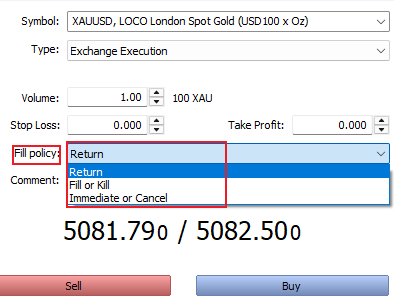
Return:
- The platform will fill an order as much as it can, and any unfilled portion may stay pending and wait to be filled later.
- Example: You place an order to buy 10 units. Only 6 are available at your price right now, so you get 6 filled immediately. The remaining 4 stay pending and may fill later if the market trades at your price again.
- Use when: you don’t mind partial fills, and you prefer the order to keep working until it completes
Fill or Kill (FOK)
- The order must be filled fully and immediately, or it will be cancelled.
- Example: You place an order to buy 10 units. If only 6 are available at the price you want, the platform will buy none and cancel the whole order.
- Use when: you only want the trade if you can get the full amount at once, and you don’t want partial fills.
Immediate or Cancel (IOC)
- The order must be filled immediately, but not necessarily fully, and any unfilled parts are cancelled.
- Example: You place an order to buy 10 units. If only 6 are available, the platform buys 6 immediately and cancels the remaining 4.
- Use when: you want quick execution, but you’re okay with partial fills and don’t want the rest to remain pending.
OCO (One-Cancels-the-Other): Prevent Double Orders
Designed to do:
OCO links two orders together so that when one order is triggered or filled, the other one is automatically cancelled. A simple way to think about it: if one order works, the other will be cancelled.
How traders commonly use OCO: breakout or breakdown
- You place a Buy Stop above the current price.
- You place a Sell Stop below the current price.
- If price moves up and triggers the Buy Stop, the Sell Stop is cancelled (and vice versa).
- Use when: you expect a big move but you are not sure whether it will go up or down.
Simple example:
Price is at 100. You set a Buy Stop at 105 and a Sell Stop at 95. If price hits 105, you enter a buy trade and the 95 order is cancelled (so you won’t enter another trade by mistake).
How Professionals Combine Orders for Risk Control
Most beginners enter first and decide later. More disciplined traders plan the whole trade before entering, so there is less emotion and fewer rushed decisions.
The simple 3-part plan
Before entering, they usually set:
- Entry: how you place a trade (limit order, stop order, or market order)
- Stop-loss: where you exit trade if it moves in the wrong direction
- Take profit or trailing stop: how you exit in profit
Example 1: “Buy at a better price” plan
- Enter using a Buy Limit at a cheaper price you want
- Set a stop-loss below it, so your loss is limited if the market keeps falling
- Set a take-profit above it, so you don’t hesitate when price reaches your goal
Example 2: “Buy only if it breaks out” plan
- Enter using a Buy Stop, so you only enter after price reaches your breakout level
- Set a stop-loss below, so you exit if the breakout fails
- Use a trailing stop to protect profits if the market keeps rising
Quick note for volatile markets (news spikes, sharp swings)
When prices jump quickly, consider using smaller size and be extra careful with entries. If you need a safer entry price, a stop-limit can help but it may not fill if price doesn’t pull back.
Key takeaway: the goal isn’t to use more order types—it’s to use them together to plan ahead, limit losses, and reduce emotional decisions.
Conclusion
Order types are practical tools that help you trade with more control. When you understand them, you are less likely to chase prices, hesitate when markets move quickly, or let losses grow because you didn’t plan an exit. Understanding how order types function is a core skill in cfd trading, because every entry, stop-loss, and exit is executed through these structured instructions.
Ready to apply this in real trading? Phillip MetaTrader 5 (MT5) supports a range of order types and execution settings, enabling traders to place trades with greater confidence and manage risk in a more disciplined way. You may start by setting up a free MT5 demo account to practise, or proceed to open a trading account on Phillip MT5 or NOVA when you are ready.